





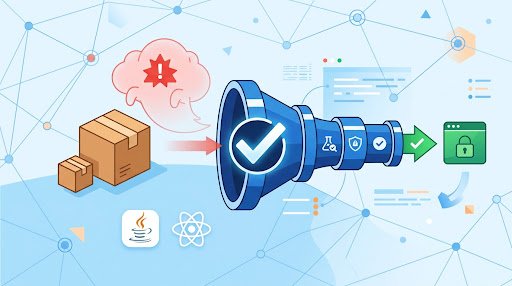
AI hallucinated dependencies should be treated as untrusted supply-chain input. A coding assistant can suggest a believable npm package, Maven coordinate, import, or installation command that is absent from the intended registry. If someone publishes software under that invented name, an otherwise ordinary dependency change can introduce an attacker-controlled component into a build.
The answer is not to abandon AI-assisted development. Make dependency admission a deliberate engineering decision. An AI suggestion can help identify a possible solution, but it should not enter a production dependency graph until its identity, source, integrity evidence, and policy status have been reviewed. Research summarized by USENIX describes code-generating models recommending packages that do not exist in default registries and explains how recurring invented names can be exploited when an adversary registers them. USENIX: package hallucinations by code-generating LLMs
Set one admission rule for every AI suggestion
Use a clear team rule: an AI-suggested dependency is untrusted until a human-reviewed pull request and deterministic CI build approve it. Apply it to direct packages, transitive graph changes, copied installation commands, and changes to package registries or artifact repositories.
A successful installation is not enough evidence. A dependency can resolve successfully while still being the wrong package, coming from an unexpected publisher, or being served by an unapproved repository. A vulnerability scan is also incomplete on its own: it can identify known issues, but it cannot establish that an AI-proposed package is the library the developer intended to use.
Before merging a dependency change, answer four questions:
- Identity: Does the exact package name or Java coordinate exist in the approved registry?
- Intent: Does it solve the stated problem, and does the publisher or maintainer match the expected project?
- Integrity: Does the build have usable verification evidence, such as committed checksums, signatures, trusted keys, or npm provenance data where available?
- Policy: Does it meet the team’s repository, security, license, and vulnerability requirements?
Verify identity before installing
Start with the exact name. For npm, confirm that the package exists in npm and that it is the package named in the maintained project’s documentation. For Java, check the complete coordinate: groupId:artifactId:version. A familiar artifact name in a different group is not necessarily supplied by the same publisher.
Do not accept a close spelling, a similarly named namespace, or a new repository URL introduced only because an otherwise missing dependency would not resolve. Review repository changes with the same care as new dependencies. Maven repositories, Gradle repository declarations, mirrors, npm registry configuration, and credentials can change where a name resolves.
Then match the registry entry to the upstream project. Confirm that the maintained documentation points to the same package or coordinates, that the source repository corresponds to that distribution, and that the required API is available in the selected release. This is a practical defense against package-like names that sound plausible but are not the maintainer’s published artifact.
For every new direct dependency, require a short pull-request note that states the capability needed, the exact package identity, and the upstream project reference. When an AI suggested the dependency, disclose that in the PR description. This is not a penalty for using AI; it tells reviewers that the name began as a claim requiring normal verification.
Build only the reviewed dependency graph
Commit the dependency-resolution and verification data your toolchain supports, then configure CI to consume that reviewed state. The objective is to prevent CI from resolving a fresh graph from loose version ranges during a production build.
For React and other npm applications, commit the lockfile and use npm ci in CI. npm documents that npm ci is intended for automated environments, requires an existing lockfile, fails when package.json and the lockfile disagree, and does not write either file. That makes it a suitable installation mode for a reviewed dependency graph. npm documentation: npm ci
For Gradle, enable dependency verification and commit its metadata. Gradle supports checksum verification as well as signature verification with trusted keys. Its documentation states that missing verification metadata or failed verification can fail the build, and identifies name squatting and repository shadowing as relevant threats. Gradle: Verifying Dependencies
Maven teams should make repository and artifact verification part of the dependency-admission review. Apache Maven’s Central Repository guidance says artifacts published to Central should carry PGP signatures and recommends that consumers verify downloaded artifacts using public keys. Signature checking supports artifact verification, but it does not replace confirming that the selected coordinates are the correct ones. Apache Maven: Central Repository upload guidance
Make dependency diffs a required review surface
Review both the human-authored manifest and generated resolution data. The manifest explains what the author requested. Lockfiles and verification metadata show the resolved packages, versions, checksums, or related dependency data that the build uses.
GitHub’s dependency-review guidance specifically recommends reviewing manifest and lockfile changes because some changes may not be represented by dependency parsing. GitHub also documents an option to fail a pull request when newly introduced dependencies have known vulnerabilities. GitHub Docs: Reviewing dependency changes in a pull request
Protect these paths with required review:
- Java projects:
pom.xml,build.gradle,build.gradle.kts, version catalogs, repository declarations, and dependency-verification metadata. - React/npm projects:
package.json,package-lock.json,.npmrc, workspace configuration, and CI workflow files. - All projects: build scripts, registry configuration, container build files, and software bill of materials files where used.
Reviewers should look for more than the new direct package. Flag unexpected package scopes, repository additions, registry changes, publisher changes, and unusually large transitive changes. A focused dependency PR makes this review practical because it limits the number of unrelated changes competing for attention.
Use provenance and vulnerability checks for different purposes
For npm packages that provide provenance information, inspect the evidence that links a published package to a source commit, build workflow, and transparency-log record. npm also documents npm audit signatures, which checks registry signatures and provenance attestations and reports an error when the relevant data is missing or invalid. npm Docs: Viewing package provenance
Missing provenance does not prove that a package is malicious. Release processes differ, including among established projects. For a newly proposed package, though, missing provenance is a useful escalation signal: obtain stronger maintainer validation, choose an established alternative, or decline the dependency.
Vulnerability scanning is a separate control. OWASP Dependency-Check identifies publicly disclosed vulnerabilities by mapping project dependencies to CPEs and associated CVEs. Use it after identity and integrity checks, rather than using scan results as evidence that a package is legitimate. A newly published malicious package may not have a known vulnerability record. OWASP Dependency-Check
Put the controls into a pull-request workflow
A lightweight workflow is more likely to be used consistently than a separate process that sits outside normal delivery work:
- Open a focused pull request containing the dependency purpose and all manifest, lockfile, and configuration changes.
- State the exact package identity, upstream project, intended capability, and whether AI suggested it.
- Validate the exact registry entry and compare it with upstream project documentation.
- Review publisher context, repository configuration, and the resolved transitive graph.
- Run a deterministic CI installation, configured integrity or provenance checks, the build and tests, and vulnerability scanning.
- Merge only after policy gates pass. Resolve identity uncertainty by selecting a different dependency or using the team’s explicit exception process.
The critical design choice is to treat AI output as input to established review, not as an automatic instruction. Put the control points in protected branches, pull requests, committed dependency metadata, and CI jobs that engineers already use.
Java and React controls at a glance
| Control | Java builds | React/npm builds |
|---|---|---|
| Approved source | Review Maven or Gradle repository changes and use approved repositories. | Review npm registry configuration changes and use the approved registry. |
| Reviewed graph | Commit applicable dependency-locking or verification metadata. | Commit package-lock.json and run npm ci in CI. |
| Integrity evidence | Use Gradle checksum or signature verification, or applicable Maven signature practices. | Review npm provenance where available and run signature/provenance checks where configured. |
| PR review | Review build files, catalogs, repository settings, and verification metadata. | Review package.json, lockfile, npm configuration, and workflow diffs. |
| Known-risk monitoring | Run software-composition or vulnerability checks. | Run npm or software-composition vulnerability checks. |
FAQ
Should teams ban AI coding assistants because of AI hallucinated dependencies?
No. Apply supply-chain controls consistently to dependencies suggested by AI, documentation, forums, or any other source. AI can assist with discovery, while pull-request review and CI determine whether a dependency is admitted.
Is a lockfile enough to prevent a malicious package?
No. A lockfile supports repeatable installation after review, but it does not prove that the original package choice was legitimate. Pair it with registry validation, upstream matching, integrity evidence, and policy checks.
Can vulnerability scanning detect slopsquatting?
Not reliably. A malicious package may be newly published and have no known CVE. Vulnerability scanning remains valuable, but it does not replace identity and provenance review.
What should a team introduce first?
Require review of manifest, lockfile, repository, and CI configuration changes; require a short rationale for each new direct dependency; and use deterministic npm installs in CI. Gradle projects can then add committed dependency-verification metadata, while teams using npm can add provenance and signature checks where available.
Sources
- USENIX: We Have a Package for You! A Comprehensive Analysis of Package Hallucinations by Code Generating LLMs
- npm Docs: Viewing package provenance
- npm Docs: npm ci
- Gradle User Manual: Verifying Dependencies
- GitHub Docs: Reviewing dependency changes in a pull request
- Apache Maven: Guide to uploading artifacts to the Central Repository
- OWASP Dependency-Check
Editorial note: AI assisted with research and drafting. Sources were selected for verification.

Full-Stack Developer & Solutions Architect · Casablanca, Morocco
8+ years building Java/Spring Boot/Angular enterprise solutions. Former Senior Software Engineer at NTT Data and Satec. Authorized Google Workspace and Microsoft 365 Partner for Morocco.