





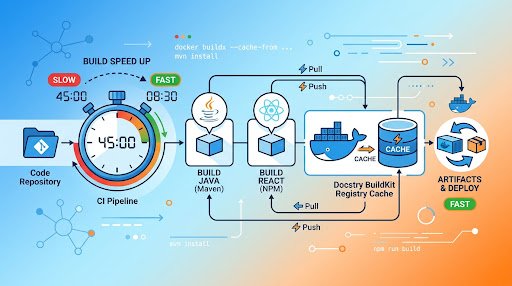
Ephemeral CI workers start without a local Docker cache. That means a build can repeatedly download dependencies, compile code, and recreate intermediate layers even when most inputs have not changed. A Docker BuildKit registry cache addresses that problem by exporting cache data to a container registry after a build and importing it during later builds.
For Java and React projects, the most important design choice is usually Dockerfile order: resolve dependencies before copying frequently changing source code. The remote cache then has useful layers to reuse across separate CI workers.
Why registry cache works for disposable CI workers
BuildKit can use external cache backends to share build cache across environments. The registry backend stores cache data at an OCI registry reference, allowing later builds to import matching layers even when they run on a different worker. This makes it suitable for CI systems where the local builder is removed after each job. Docker’s registry cache documentation
Keep the cache distinct from the deployable application image. The application image represents a runnable artifact; the cache represents reusable build work. Separating them lets teams manage retention, permissions, and cleanup independently.
A remote cache is most useful when builds run often enough for cache downloads and storage to cost less than repeated dependency resolution and compilation. It may offer limited value for small images, infrequent builds, or jobs dominated by work Docker cannot cache, such as external test services.
Structure Dockerfiles around stable inputs
Docker evaluates build instructions in order. When an earlier instruction changes, later layers must be reconsidered. A broad COPY . . before dependency installation means an ordinary source edit can invalidate the dependency-install layer. Docker recommends copying dependency manifests first, installing dependencies, and only then copying the remaining application files. Docker build cache optimization guidance
| Layer group | Typical inputs | Expected invalidation | Purpose |
|---|---|---|---|
| Toolchain | Base image and system packages | Base-image or toolchain update | Defines the build environment |
| Dependencies | pom.xml, lockfiles, package manifests |
Dependency definition change | Preserves dependency download work |
| Application | Source code and resources | Normal source change | Limits rebuilds to compilation or bundling |
| Runtime | Built artifact and runtime base | Artifact or runtime-base change | Keeps build tooling out of the runtime image |
This does not eliminate invalidation. It makes invalidation match the input that changed. A dependency update should rebuild dependency resolution. A source edit should generally leave the dependency layer reusable.
Configure Buildx with a dedicated cache reference
Use --cache-from to import cache candidates and --cache-to to export cache records produced by the build. The following example pushes an application image and exports a separate registry cache:
docker buildx build \
  --push \
  --tag registry.example.com/team/catalog:${GIT_SHA} \
  --cache-from type=registry,ref=registry.example.com/team/catalog:buildcache-main \
  --cache-to type=registry,ref=registry.example.com/team/catalog:buildcache-main,mode=max \
  .
BuildKit validates imported cache candidates against the current instructions and inputs. Importing a cache does not force BuildKit to reuse an incompatible layer.
The registry backend supports min and max export modes. Docker documents min as the default and max as the option that exports cache for intermediate stages. Multi-stage Java and frontend builds commonly benefit from mode=max because expensive work often occurs before the final runtime stage. Docker registry cache backend reference
Do not silently ignore cache-export failures as a default policy. A cache miss can be expected on a cold build, but authentication, repository, or export failures deserve visibility because they can remove the expected benefit of the CI configuration.
Spring Boot: retain reusable dependency work
Spring Boot supports layered JARs. Its documented layer model separates dependencies, the Spring Boot loader, snapshot dependencies, and application code. The jarmode=layertools extraction path can place those layers into a runtime image independently, allowing application changes to avoid disturbing unchanged dependency content. Spring Boot layered JAR documentation
The build stage should still expose Maven inputs before application source:
# syntax=docker/dockerfile:1
FROM maven:3-eclipse-temurin-21 AS build
WORKDIR /workspace
COPY pom.xml .
COPY .mvn .mvn
COPY mvnw .
RUN --mount=type=cache,target=/root/.m2 ./mvnw -q -DskipTests dependency:go-offline
COPY src src
RUN --mount=type=cache,target=/root/.m2 ./mvnw -q -DskipTests package
RUN java -Djarmode=layertools -jar target/*.jar extract

FROM eclipse-temurin:21-jre
WORKDIR /app
COPY --from=build /workspace/dependencies/ ./
COPY --from=build /workspace/spring-boot-loader/ ./
COPY --from=build /workspace/snapshot-dependencies/ ./
COPY --from=build /workspace/application/ ./
ENTRYPOINT ["java", "org.springframework.boot.loader.launch.JarLauncher"]
This pattern uses two different cache mechanisms. The registry cache exports BuildKit layers between builders. The Maven cache mount can reuse downloaded Maven artifacts where builder storage persists, but a cache mount alone should not be treated as portable storage between isolated CI workers. BuildKit distinguishes local cache mounts from exported external cache data. Moby BuildKit documentation
React: make the lockfile the dependency boundary
For a React build, copy the package manifest and lockfile before the rest of the project. Run the package manager’s deterministic CI installation command, then copy source files and build. Docker’s cache guidance uses this ordering to prevent ordinary source changes from unnecessarily reinstalling dependencies. Docker dependency-layer guidance
# syntax=docker/dockerfile:1
FROM node:22 AS build
WORKDIR /app
COPY package.json package-lock.json ./
RUN --mount=type=cache,target=/root/.npm npm ci
COPY . .
RUN npm run build

FROM nginx:alpine
COPY --from=build /app/dist /usr/share/nginx/html
Verify the build output directory before adopting the example. Different React toolchains can use different output paths. Add a focused .dockerignore so local dependency directories, generated output, logs, and version-control files do not enlarge the build context or cause unnecessary cache changes. Docker recommends .dockerignore for reducing context transfer and avoiding accidental invalidation. Docker build-context guidance
Choose cache references deliberately
A mutable cache reference such as buildcache-main can support builds from a protected main branch. Branch builds can import both a branch-specific cache and the main cache, while exporting to a branch-specific reference. This is a practical policy rather than a BuildKit requirement.
- Import the branch cache first, followed by the main cache.
- Restrict writes to shared cache references to trusted CI contexts.
- Use separate cache namespaces when build architecture, operating-system base, or dependency ecosystem differs.
- Create a new cache reference after an intentional broad change, such as a build-toolchain migration.
- Set registry retention rules for cache references separately from release images.
The aim is compatibility, not convenience. A cache reference should represent builds that are likely to share valid layers.
Plan invalidation instead of disabling cache
A source-only change should normally rebuild application compilation and runtime assembly. A lockfile or pom.xml change should rebuild dependency resolution and later layers. A Dockerfile change affects that instruction and later instructions. A base-image update intentionally affects downstream layers.
Docker documents that changed earlier layers require rebuilding from that point onward. That behavior is why manifest-first Dockerfiles matter more than simply enabling a registry cache. Docker cache invalidation guidance
Dependency freshness should be handled through declared dependency inputs, lockfiles, controlled dependency updates, and base-image refresh policy. Caching accelerates known inputs; it should not define which dependency versions a project accepts.
Measure the full CI tradeoff
A registry cache exchanges registry storage and network transfer for reduced build computation and dependency downloading. Measure full job duration rather than only the docker buildx build step. Include cache import, cache export, image push, and relevant queue or transfer time.
Compare representative cold builds, source-only changes, dependency changes, Dockerfile changes, and base-image refreshes. Record total duration, cache-hit output, transferred bytes where available, and cache-related failures. Avoid promising a universal percentage improvement because build topology, dependency size, and registry proximity affect the result.
Google Cloud Build notes that retrieving cached images from a registry adds time while also recommending caching and smaller runtime images as ways to improve build performance. Google Cloud Build build-speed guidance
FAQ
Does a Docker BuildKit registry cache replace the production image?
No. The registry cache backend stores cache data separately from the output image artifact. Docker registry cache documentation
Should every project use mode=max?
No. Use it when reusable intermediate stages justify the additional cache export, storage, and transfer. Docker documents min as the default and max as the mode that includes intermediate-stage cache. Docker cache export modes
Can cache mounts replace a registry cache on disposable CI workers?
Not by themselves. Cache mounts are builder-local package caches, while exported external cache data is intended for reuse across builders. Moby BuildKit documentation
Sources
- Docker Buildx Cache Storage Backends: Registry Cache
- Docker Build Cache Optimization
- Spring Boot Reference: Packaging Container Images and Layered JARs
- Google Cloud Build: Best Practices for Speeding Up Builds
- Moby BuildKit Repository and Documentation
Editorial note: AI assisted with research and drafting. Sources were selected for verification.

Full-Stack Developer & Solutions Architect · Casablanca, Morocco
8+ years building Java/Spring Boot/Angular enterprise solutions. Former Senior Software Engineer at NTT Data and Satec. Authorized Google Workspace and Microsoft 365 Partner for Morocco.